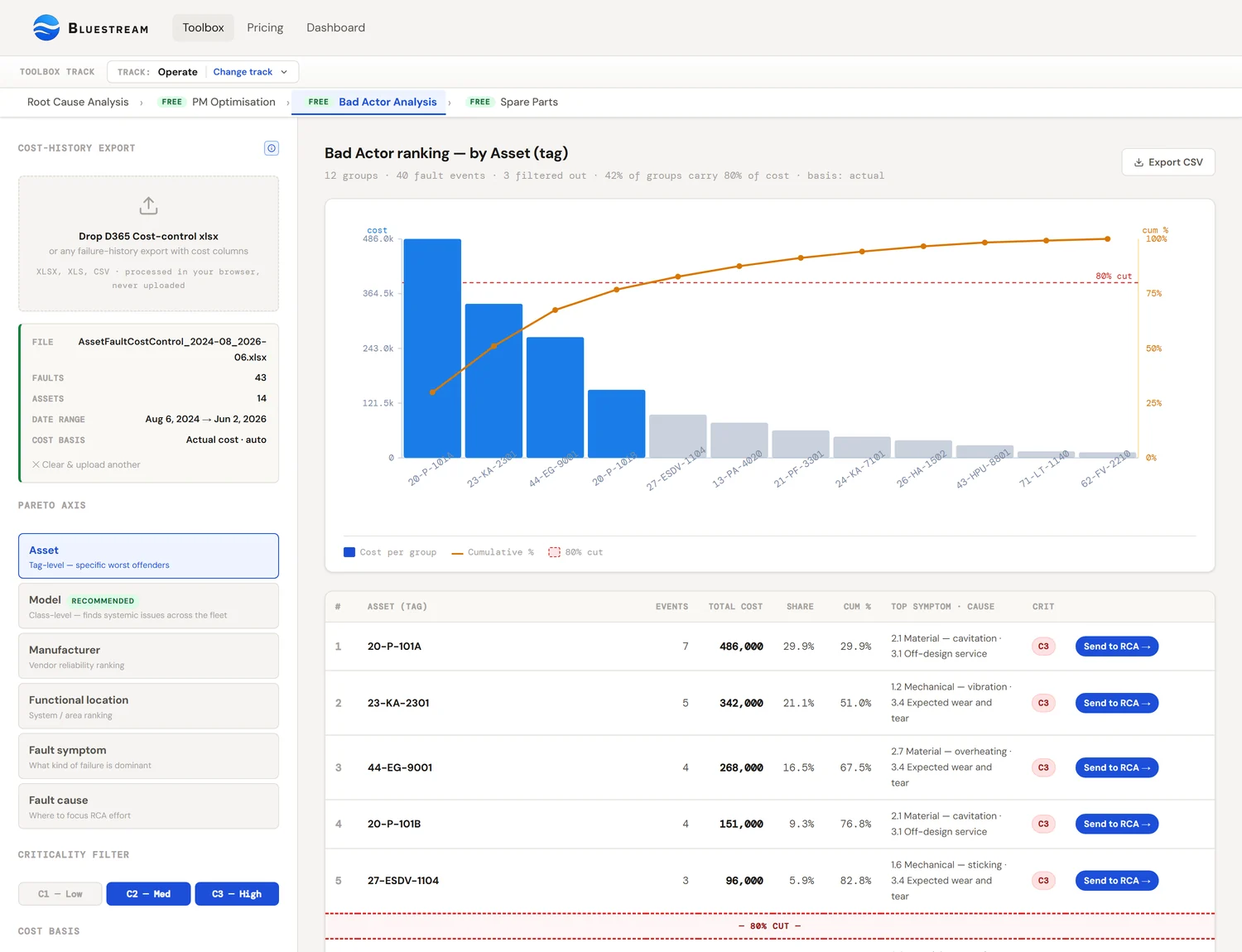
Bad Actor analysis ranks equipment by where the cost actually lives, so root-cause effort goes to assets where it pays back. The Pareto principle (~20% of assets cause ~80% of cost) makes the ranking sharp enough to act on.
Three axes tell three different stories: cost finds the expensive failures, frequency finds the irritating repeat-offenders, HSE consequence finds the dangerous ones. Pick the one the business actually cares about — or read all three in sequence. The Toolbox ranks on cost today, and carries the other two as an events column and a criticality filter.
The output is a short list. The next step is always the same: take the top 1–3 entries into Root Cause Analysis and feed the findings back into FMECA and RCM.
The big idea: most of the pain comes from a small number of assets
If you sort the equipment in any operating facility by total maintenance spend and draw a cumulative line, the curve is usually strongly skewed, though how sharply varies by dataset: a steep climb at the start, then a long flat tail. A small head of the distribution — usually around 20% of the equipment population — carries the majority of the cost. This is the Pareto principle, named after Vilfredo Pareto who first observed it in late-19th-century Italian land ownership and which has since shown up in essentially every cost or quality distribution that has been measured.
In maintenance terms the consequence is simple. If you spread improvement effort evenly across the asset register, most of it lands on equipment that isn't actually a problem. The same effort, focused on the top 10–20 tags, would move the needle much further. Bad Actor analysis is the structured way to identify which tags those are, on which axis, and what to do about them.
The work is not the ranking. The work is what comes after — root cause analysis on the top offenders, then revisions to the FMECA and RCM so the next failure on a similar asset is rare instead of inevitable. Bad Actor is the prioritisation step that decides where to point the RCA effort. Without it, RCA gets done on whatever failed last week, not on what's costing the most.
Three axes, three stories
The same dataset produces different rankings depending on what you measure. There is no single correct axis; the right one is determined by what the business is trying to optimise. Most useful Bad Actor work runs all three and looks at the overlap.
By cost
Sum the maintenance cost charged against each asset (or model, or location). Rank descending. The top entries are where money is actually going. This is the default for finance-driven reviews.
By frequency
Count fault events per asset (or per failure mode) and rank descending. In the Toolbox today this is a column, not a ranking: the table shows the event count beside the cost so you can spot a high-count/low-cost tag, but the ordering is still by cost. The top entries are the repeat-offenders — the tags that consume planner attention, fitter time, and store-room patience even when each event is cheap.
By HSE consequence
Weight events by consequence class (Z-008:2024 Table C.1 gives C1/C2/C3 as an informative example, and permits three to five classes aligned to your corporate risk matrix or equivalent) and rank by total weighted score. The Toolbox does not compute that weighted score yet; what it gives you is a criticality filter, so you can run the cost Pareto across C3 assets alone and read the answer that way. The top entries are the assets that could hurt someone or release containment, even if they haven't yet.
The Bluestream Bad Actor tool ranks by cost from a single export. The sidebar picker changes what you group by — asset, model, manufacturer, functional location, fault symptom or cause — which is often the more useful lever: the same export grouped by model instead of by tag is what turns twelve separate bad actors into one bad pump type. Frequency and criticality-weighted ranking are roadmap. A standard workflow is:
- Cost first — that's what the business will fund work against.
- Frequency second — that's what the planners will recognise. Any asset that's top-20 on both is unambiguous.
- HSE third — even if a C3 asset isn't on the cost or frequency lists, a single failure could change that. Track them separately.
Reading the Pareto chart
A Pareto chart is a bar chart sorted by descending value, overlaid with a cumulative-percentage line. The bars show how much each entry contributes; the cumulative line shows how quickly you reach the majority. The 80 % line is the conventional Pareto/Juran reference, not a threshold from any standard — treat it as a reading aid rather than a rule.
What to look for when reading the chart:
- The first 2–3 bars are nearly always disproportionately tall. These are the obvious priority candidates.
- The elbow position tells you how concentrated the cost is. A sharp elbow at 2–3 entries means the problem is very localised; you only need a couple of RCAs to make a real dent. A gentle slope with no clear elbow means cost is spread out, which usually points at a systemic issue (a generic-maintenance-concept gap, a sourcing problem, a training gap) rather than specific bad assets.
- The long tail is informative even if you won't act on it. Each tail entry is cheap on its own; in aggregate they often represent the baseline cost of running the program. If the tail keeps growing year on year, the program is degrading even if the top isn't.
Choosing the right cost basis
A modern CMMS exposes several cost columns per work order — what was budgeted, what was actually posted, what was classified as corrective vs preventive, and so on. The Bad Actor ranking changes depending on which column you sum. Pick deliberately.
| Cost basis | What it represents | When to use it |
|---|---|---|
| Actual cost | The total cost actually posted to the work order after it closed — labour, materials, contractors, the lot. | The default for any mature program with closed work orders. Reflects what really happened. |
| Corrective cost only | The subset of Actual cost that the CMMS classified as reactive / unplanned / breakdown response (as opposed to scheduled PM). | When you want to find unplanned bad actors — assets where the PM strategy is failing. Filters out the baseline planned-work cost. |
| Original budget | The cost committed at work-order planning time, before the work actually happened. | Test environments (UAT) and any tenant where work orders haven't been posted yet. Use as a fallback when Actual cost is empty. |
| Preventive cost | The subset classified as planned / preventive maintenance. | Reverse Bad Actor: assets receiving the most preventive spend are candidates for PM optimisation (PMO) — maybe the strategy is over-engineered. |
The Bluestream tool defaults to auto-detect: it scans the dataset and picks Actual cost if it's non-zero, falls back to Corrective cost, then to Original budget. So UAT exports just work, mature-prod exports just work, and there's no configuration step. You can override the basis explicitly from the dropdown.
The corrective vs preventive distinction is only as good as the CMMS coding. If your work-order categorisation is loose (technicians put "Repair" against everything), the corrective-cost number won't be reliable. Either spend a session cleaning the historical coding, or fall back to Actual cost as the basis and treat the result as "all-in" spend without splitting planned from unplanned.
Filter by criticality first
Most asset registers have hundreds of C1 (low-consequence) tags — spare pump bodies, redundant utility valves, abandoned-in-place instruments. They show up in the Pareto if you let them, and they drown the signal. The Bluestream tool defaults to C2 and C3, which is almost always what you want for a real Bad Actor exercise. Two things stay in regardless: the top button reads “and above”, so a 4 or 5 on a company scale is kept rather than silently dropped, and tags carrying no criticality value at all are kept whenever any class is selected. An unclassified tag with real spend against it is one of the more useful things a bad-actor study can surface, so it is not treated as a C1.
Toggle C1 back on if you want a complete picture, but the analysis is usually cleaner without it. If a C1 asset is consuming a lot of cost, the question that asks itself is whether the criticality is correctly rated — not whether to attack the asset.
A worked example
Suppose you drop a 12-month, 100-event cost export into the tool. The Pareto, ranked by model, comes out something like this:
By cost (Actual basis)
Pareto · top-down2. Frame 5 turbine $ 559,000 (23.3%, cum 47.2%) · 4 events
3. BB2 ANSI pumps $ 225,000 ( 9.4%, cum 56.6%) · 23 events
4. Centaur 40 compressors$ 208,000 ( 8.7%, cum 65.3%) · 6 events
5. M6-MFG heat exchanger $ 148,000 ( 6.2%, cum 71.5%) · 3 events
6. BEM Shell/Tube HE $ 124,000 ( 5.2%, cum 76.7%) · 2 events
7. BB3 pumps $ 121,000 ( 5.1%, cum 81.7%) · 11 events
—— 80% cut ——
Two gas-turbine models drive nearly half the spend off the back of just 7 events. The Pareto-by-cost answer is to look at the turbines first.
Now switch to the frequency axis on the same data:
By frequency (event count)
Pareto · top-down2. BB3 pumps 11 events
3. OH2 pumps 10 events
4. Centaur 40 / BB1 6 events each
...
A completely different story. The turbines are nowhere near the top — they're rare events. But BB2 ANSI pumps fail 23 times in a year across 5 tags. That's an average of nearly one failure per pump every two months. The Pareto-by-frequency answer is BB2 ANSI — almost certainly a systemic class issue (coupling, mounting, seal flush, something common to the model).
The combined reading: if you only had budget for one investigation, the turbines pay back faster on a per-event basis but the BB2 ANSI population is a class-level systemic problem that, if solved, prevents 20+ future events. Mature programs run both: RCA on the next major turbine event when it happens; immediate Generic Maintenance Concept review for the BB2 ANSI fleet.
From ranking to RCA
The ranking is not the deliverable. The deliverable is the changes you make to the maintenance program based on it. The Bluestream tool makes this explicit: every row in the ranked table has a Send to RCA button that pre-populates the Root Cause Analysis tool with the asset, top symptom, top cause, and cost context.
From there the loop is the standard Operate-track flow: RCA on the top offender → corrective and preventive actions → write-back into FMECA (the new or refined failure mode) and RCM (the revised maintenance strategy). The next Bad Actor refresh, run a quarter later, should show the offender dropping down the list — that's the audit signal that the program is improving.
Refresh cadence: monthly is plenty for most facilities. Quarterly is fine for stable programs. Re-running Bad Actor weekly produces too much noise — individual events shift the ranking and you end up chasing the wrong tail. Aggregate periods are more signal-rich than instantaneous ones.
Getting the input file from your CMMS
The Bluestream Bad Actor tool ingests any spreadsheet with at minimum an Asset column, a Fault column, and a cost column. Different CMMSs expose this data via different paths and column names. In this first version the header names have to match exactly — Asset, Fault and a cost column — so an export from any other CMMS needs its headers renamed first. The sections below cover where the data lives in each system; the renaming is a one-off you can save as a spreadsheet template.
If your CMMS isn't listed yet, the universal fallback is: export work-order history with one row per cost transaction, including asset tag, fault description, criticality, and cost columns. Save as .xlsx or .csv and drop it in the upload zone.
Microsoft Dynamics 365 — Asset Management
SupportedD365 Asset Management ships a purpose-built Asset fault cost control inquiry that produces exactly the right shape with no transformation needed.
Path
Modules → Asset management → Inquiries → Asset fault → Asset fault cost control
Step-by-step
- Open the inquiry above. You'll see four grouping panels: Group by date, Group by asset, Group by functional location, Group by fault, and Group by project.
- Tick every chip across all five groups. This produces the maximum-resolution 26-column export. Sub-tools can collapse fields later; we want everything on the way out.
- Click Calculate cost. The grid below populates with one row per cost transaction (typically 1 header row + 1 Hour row + 1 Item row per fault).
- Use the standard D365 Export to Excel button (Office button at the top, or right-click → Export all rows). The file lands as
Cost control_*.xlsxin your Downloads folder. - Drop the file into the Bad Actor tool's upload zone. The tool reads the 26 columns directly — no renaming, no transformation.
Field mapping
The D365 columns map to internal keys as follows (handled automatically by the importer):
| D365 column | Used as |
|---|---|
Fault | The aggregation key — one fault may produce several transaction rows that are summed |
Asset · Model · Manufacturer · Asset type | Pareto axis choices (tag-level vs class-level vs vendor) |
Criticality | 1 / 2 / 3 filter at the top of the sidebar |
Functional location · Functional location type | System-level Pareto axis |
Fault symptom · Fault area · Fault type · Fault cause | Failure-mode Pareto axes — useful for RCA targeting |
Actual cost | Default cost basis when posted |
Corrective cost | Cost basis when you want to isolate reactive spend |
Original budget | Fallback for UAT or pre-posting environments |
Fault date · Year · Quarter · Month · Week | Date facets for time-range filtering (currently informational; date filter ships in v2) |
Notes specific to D365
- Each fault expands to 3 rows (or sometimes more): a header row with the fault metadata and blank cost cells, plus one transaction row per cost line (typically Hour = labour and Item = spares). The tool sums by Fault ID and ignores blank-transaction header rows automatically.
- In a fresh UAT tenant,
Actual costis empty because work orders are still in planning. The tool falls back toOriginal budgetautomatically, so you can prototype the analysis before go-live. - The Asset fault analysis inquiry (one level above Cost control in the menu) returns frequency and probability data but no cost. It's a useful cross-check but Cost control is the right primary source.
- The Asset fault PDF report (under
Reportsrather thanInquiries) is for sign-off and archival; not exportable in a useful format for analysis.
SAP PM (Plant Maintenance)
Walkthrough comingThe right SAP PM source is the IW39 / IW49 work-order list with cost fields (Actual cost · Planned cost) and the asset/notification hierarchy. We're documenting the exact field selection, the right cost layout variant, and how to handle the standard PM-vs-CO settlement split. Until then, export IW39 with at minimum: Equipment, Functional Location, Object Part / Damage / Cause / Activity (the four-level catalog), and Actual cost. Save as .xlsx and drop into the tool — the Equipment column maps to Asset, the catalog fields map to Fault symptom / area / cause.
IBM Maximo
Walkthrough comingMaximo customers should pull from the WORKORDER / FAILUREREPORT entities, joined to ASSET for criticality, with the Actual Labor + Actual Material cost columns. We're documenting the standard report or BIRT export. Until then, the work-order list view in the Work Order Tracking application, exported with Asset, Failure Class, Problem, Cause, Remedy, and the cost summary columns, works as-is.
eMaint / Fiix / Asset Care / Other
Walkthrough comingMost modern cloud CMMSs (eMaint, Fiix, MaintainX, Limble, UpKeep) and Microsoft-stack variants (Asset Care, Dynaway) expose a work-order export with the same fundamental fields: asset tag, failure category, cost. The Bad Actor tool's flexible column matcher accepts any spreadsheet with those minimum columns — the tool will detect headers like Asset, Fault, and Actual cost and route them automatically.
Common mistakes
- Running Bad Actor weekly. Individual events move the ranking around; the wrong asset ends up at the top because of last Tuesday. Monthly is the minimum useful cadence; quarterly for stable programs.
- Acting on cost alone for safety-critical assets. A C3 asset that hasn't failed yet costs nothing. That doesn't mean it's not your highest priority. Always check the HSE axis separately.
- Ignoring the long tail. The tail is the program's baseline running cost. If it grows year-on-year while the head shrinks, you're cleaning up bad actors but the program quality is degrading underneath. Track total tail spend as a separate KPI.
- Picking the wrong group dimension. Grouping by Asset (individual tag) finds specific bad actors; grouping by Model or Asset Type finds class-level bad actors. The class-level grouping is what catches systemic Generic Maintenance Concept issues; the tag-level grouping catches one-off installation problems. Run both.
- Using Actual cost when the CMMS is poorly coded. If technicians put "Corrective" against scheduled work because the dropdown is confusing, your corrective-vs-preventive split is wrong. Spend a session cleaning the historical coding before relying on the split, or fall back to total Actual cost.
- Stopping at the ranking. The ranked table is not an output. The output is the changes to the FMECA / RCM / GMC for the top entries, and the RCA reports that justify those changes. A Bad Actor list with no follow-through is documentation, not analysis.
References
- IEC 62740:2015 Annex A and §6.3. Prioritisation of failure events for root cause analysis. The standard's framing of which events warrant investigation, which the Pareto step implements operationally.
- ISO 14224:2016 — the taxonomy underlying the Asset / Asset type / Failure mode fields in any compliant CMMS export, including D365. Makes cross-tenant comparison meaningful.
- NORSOK Z-008:2024 — consequence classification (Criticality 1/2/3) that drives the HSE-axis Pareto and the default C2+C3 filter.
- Juran, J. M. — the management consultant who applied Pareto's observation to quality and reliability engineering in the 1940s and coined the phrases "vital few" and "trivial many."
- Pareto, V. (1896–1897) Cours d'Économie Politique. The original observation that 80% of land was owned by 20% of the population — later generalised to almost every cost or quality distribution.
- API RP 581 — risk-based inspection; companion methodology for pipeline and pressure-vessel Pareto work where the cost axis is inspection effort.